Fix Loading More Post Problem In Blogger | welcome to the TutBig Blogger tutorial today I will show you how to fix Tab loading more post problem in Blogger blog with pictures. When we add Blog page tab to menu bar and when we click tab menu than lot of post are loading in Blogger page.

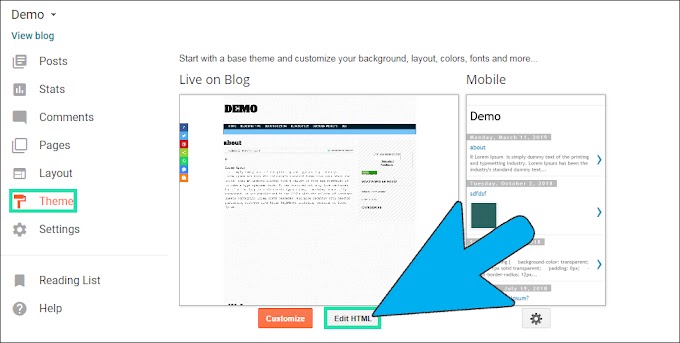
Step 1: First go to Blogger Theme and click Edit HTML button.

Step 2: Find the Tabs links like click anywhere in the Code press Ctrl+F and find <li> or Home.

Step 3: In this link we add the " ?max-results=5 " Code.

Before->>I hope you enjoy this Post.Fix Loading More Post Problem In Blogger
<li><a href=”https://kod4u.blogspot.com/search/lable/html”> HTML </a></li>
After->>
<li><a href=”https://kod4u.blogspot.com/search/lable/html?max-results=5”> HTML </a></li>