Welcome to the Tutbig Google AdSense tutorial today I will show you how to insert put Adsense ads in Blogger post footer with pictures.

The best place for inserting ads is a blog post footer. This is hot zones because blog or website to get a high increase the click-through rate.
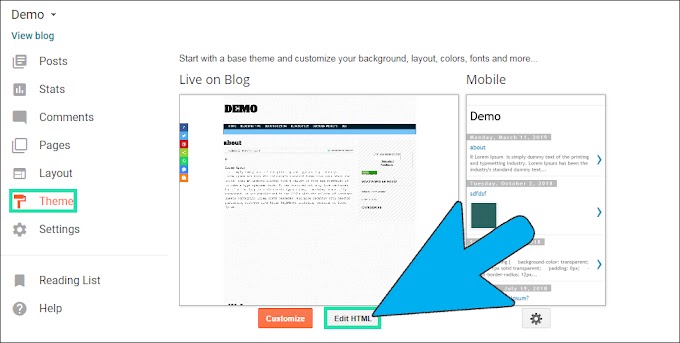
Step 1: Open Blogger theme link and click Edit HTML button.
 Step 2: Here we click anywhere in the code and press Ctrl+F paste "<div class='post-footer'>" tag, then enter twice and paste the Ad code above the "<div class='post-footer'>" tag. At last, click Save theme orange button.
 Step 3: Now open the Blogger blog.
 How to Upload Video to Blogger Step by Step Tutorial
How to Import Blogger to WordPress Step by Step Tutorial
I hope you enjoy this post and the photos. Put AdSense Ads in Blogger Post Footer

The best place for inserting ads is a blog post footer. This is hot zones because blog or website to get a high increase the click-through rate.
Step 1: Open Blogger theme link and click Edit HTML button.


How to Import Blogger to WordPress Step by Step Tutorial
I hope you enjoy this post and the photos. Put AdSense Ads in Blogger Post Footer